Essay / Software engineering
What do we really mean by "build" in Software Engineering?
If you have worked in the Software Industry even for a little bit, you must have heard phrases like The build is broken. Did the build pass yet? Send me the latest build. Same word, used in multiple contexts, and a bit confusing initially because people generally assume that you know it. I have been in that situation and know the feeling. Let’s see what is actually happening.
The world without builds
Imagine you wrote a python file and ran it. python hello.py. The file you wrote is the file that ran. There’s no “build” thing that happened (btw something like build actually took place but it was abstracted out). Your source code is your program.
# hello.py

print("Hello, world!")
This works for tiny scripts. But there’s a fundamental gap hiding underneath.
The gap between source code and machine code
The CPU (which actually executes your code instructions) doesn’t understand Python. Or JavaScript. Or Java. It understands only machine code, i.e. the 1’s and 0’s. These 1’s and 0’s serve as the raw instructions for the processor. Sequences of binary instructions like 10110000 01100001 that tell it to move data, add numbers, jump to other instructions, and so on. Whatever you write, eventually something that looks like machine code has to reach the CPU. So somewhere between “the text you typed” and “instructions the chip executes,” something has to translate.
Humans cannot realistically write machine code, so we invented source code, which is text written in a programming language that humans can read and reason about
def greet(name):
    return f"Hello, {name}"
Source code is for humans. Machine code is for the machine. There is a gap between them.
”Build” is the bridge across that gap
Build -> the process that turns source code (what you write) into something a computer can actually run.
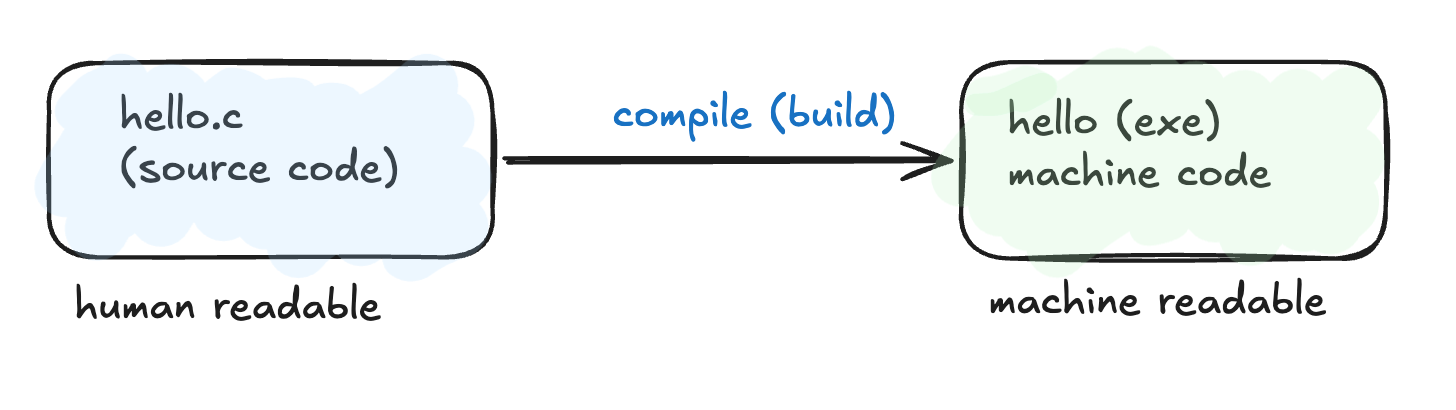
In the simplest case, say, a tiny C program, the build is one step: a compiler translates source code into machine code.
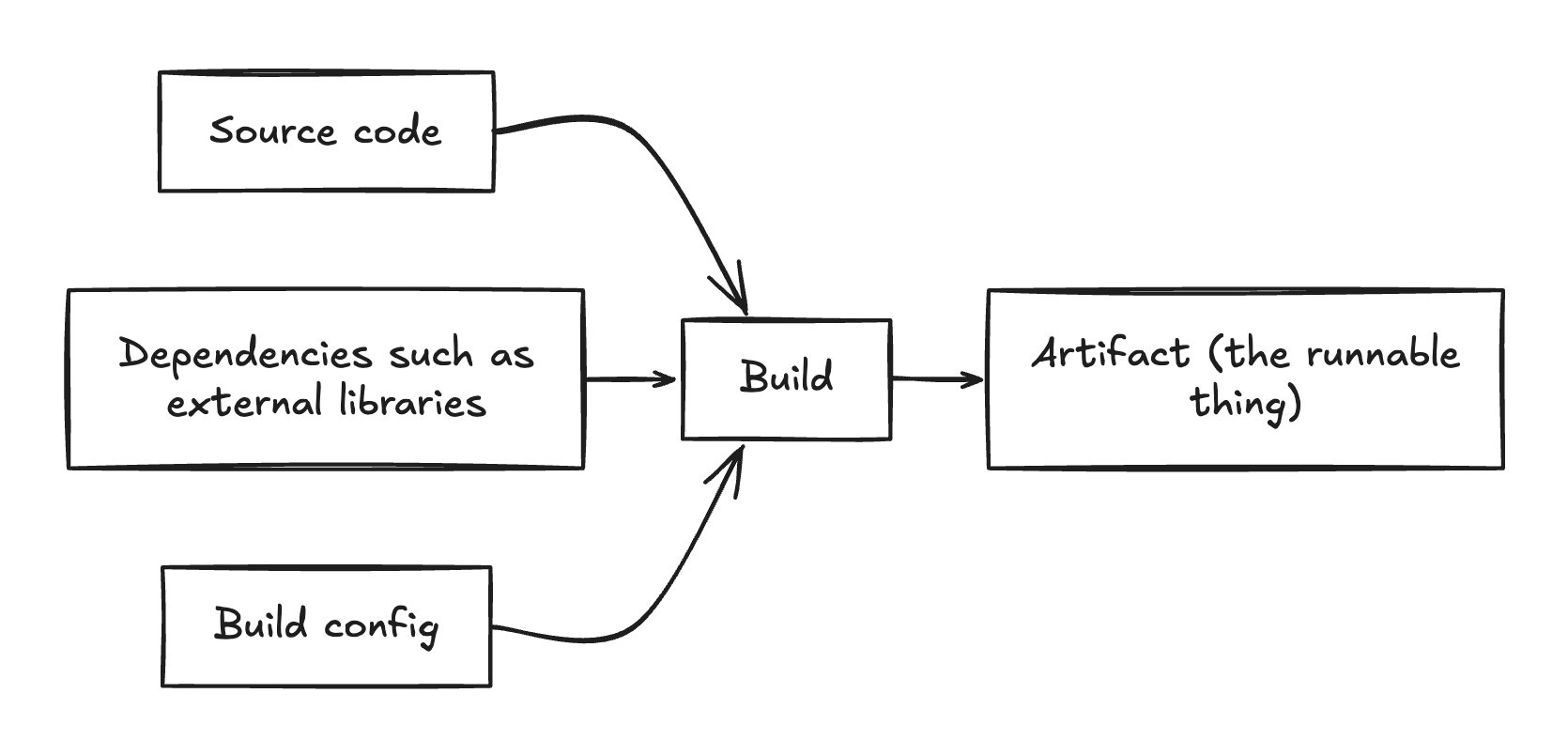
The output, also called the build artifact is the runnable, shippable thing. That’s what gets deployed to a server, uploaded to an app store, or served to a browser.
The word “build” itself is borrowed from construction. You have raw materials (source files, libraries, assets) and you assemble them into something usable. The resulting thing is the artifact: literally, a thing made by craft.
Why real builds are more complex
Tiny programs are tidy. Real software is not. As soon as a project grows, the build has to deal with several realities:
- Code is split across many files. A real app has dozens or thousands of source files. Each one has to be processed and then stitched together.
- Code depends on other code. Almost no project is self-contained. You import libraries written by other people, such as a database driver, a web framework, or a datetime utility. The build system has to fetch and include them in the final output thing.
- Source code doesn’t always compile straight to machine code. It may compile to an intermediate format (Java’s bytecode), get transpiled to a different language (TypeScript → JavaScript, since browsers don’t understand TS), or get bundled (many JS files merged into one optimized file). You might also want to reduce the size of the files (e.g. removing comments since they don’t execute in the processor anyway).
- The output has to fit a target environment. A browser, a phone, a Linux server, and an embedded chip each require a different form of final artifact. You might need one machine code for macOS, another for Linux, and another for Windows since their processors are different.
So “build” naturally expanded to mean: all the steps required to take raw source code and produce a deployable artifact.
Same idea, three different ecosystems
The principle is identical. Only the details change.
A C program
gcc main.c utils.c -o myapp
gcc compiles each .c file into an object file, links them together, and produces myapp , an executable file. Build done.
A Java application
mvn package
Maven downloads dependencies from the internet, compiles .java files into .class files (Java bytecode, not native machine code), and packages everything into a .jar. The Java Virtual Machine runs the bytecode at runtime. The build artifact here is the .jar file, which you can run with the command java -jar myapp.jar.
A modern web frontend (React / TypeScript)
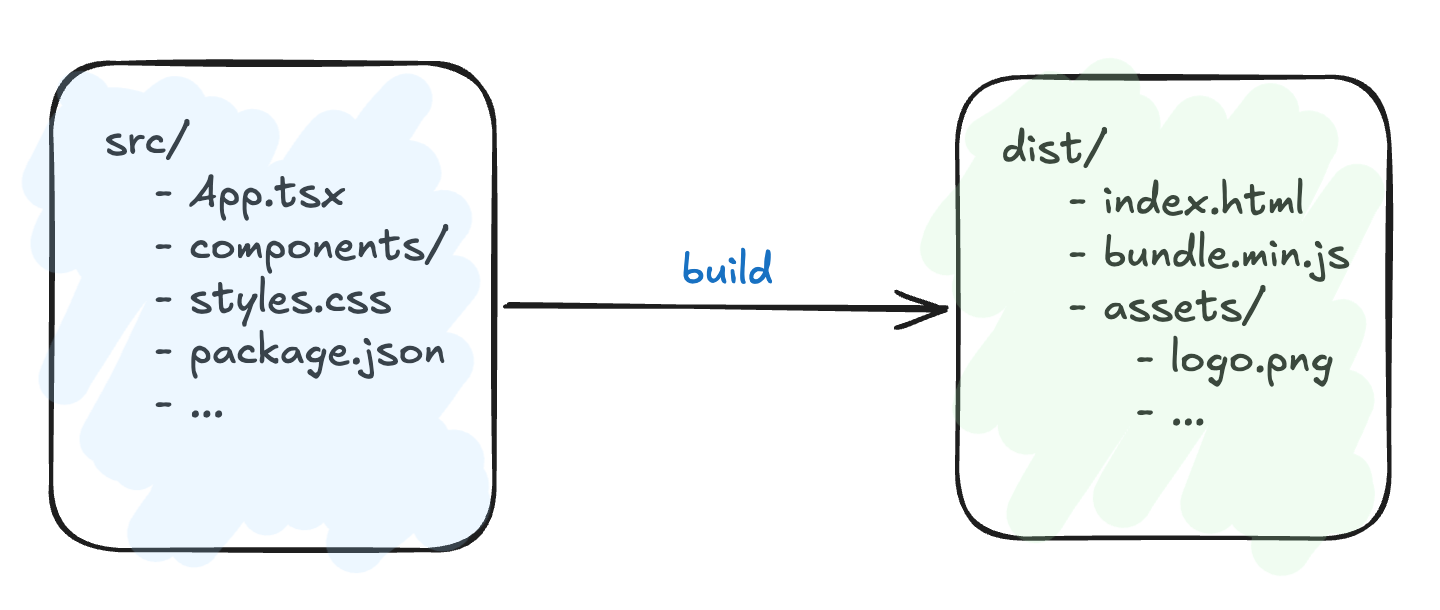
npm run build
A lot happens under the hood:
- Resolve and install dependencies listed in
package.json - Transpile (converting code from one language/version to another) TypeScript (TS) → JavaScript(JS) (since browsers don’t understand TS)
- Bundle hundreds of files into a handful of optimized ones
- Minify them → strip whitespace, shorten variable names → to reduce file size
- Output a
dist/folder ready to be served
The browser doesn’t run your source code, it runs the built bundle.
What modern builds actually do
Compiling is just one piece. A real build today often does more:
- Resolves dependencies (downloads the libraries your code depends on)
- Generates code (e.g. types from a Protobuf schema — schema defines the structured format of data (fields, types, and rules) and some code for getting and setting the fields gets auto-generated during the build process)
- Compiles or translates the source
- Runs a linter (catches style issues and bug-prone patterns)
- Runs a type checker
- Runs tests (unit and integration tests)
- Bundles and packages everything
Any of those steps can fail. When someone says “the build broke,” they mean one of these stages stopped the pipeline. Finding which one failed and why is a normal part of the work.
Build tools
A build needs something to run it. That something is the build tool. It reads a config file that describes the recipe (the steps needed to create the build), then executes it. Some of the common ones you will come across:
make(with aMakefile) → the grandparent of them allnpm/pnpm/yarn→ used in JavaScript and TypeScript projects such as React, Angular, Node.jsgradle/maven→ used in Java (or JVM in general) based projects such as Spring Boot
The ecosystem can be any, but the job of the build tool is the same: take the recipe and produce the artifact.
”Build” used in different contexts
This trips up everyone new. “Build” gets used as:
- A verb → “I’ll build the project” (run the transformation, i.e. running the command which collects the source files, dependencies and configs in a pre-defined manner to output a build).
- A process → “The build is running” (the transformation is in progress).
- A state → “the build is broken” (something in the process failed).
- An artifact → “send me the latest build” (the output file).
- An instance → “build #1247 failed” (one specific run, usually numbered by a CI server → the automated system that builds your code on every change).
When you hear the word, figure out which one is meant from context. Usually it’s obvious. When it isn’t, ask.
Once you see “build” as the bridge from human-readable source to machine-runnable artifact, a lot of common jargon clicks into place:
- “The build is broken” → Some step in the pipeline failed. Maybe a syntax error stopped compilation, or a missing dependency broke linking.
- “CI/CD pipeline” → An automated system that runs the build on every code change to make sure things still work.
- “Build artifact” → The output of the build — the file(s) you actually deploy.
Works on my machine
A build is supposed to be reproducible. Same source, same dependencies, same config → same artifact. If your teammate builds the project, they should get what you got.
When this breaks, it is almost always because of an environment mismatch (an environment is the complete set of configurations, dependencies, and infrastructure in which a software application runs). It could be a different version of Node, a different compiler, and so on. “It works on my machine” is often a build problem in disguise.
The takeaway
Source code is what you write. Machine code is what the CPU runs. The build is everything in between, including compilation, dependency resolution, bundling, and packaging, that turns one into the other.
A simpler way to hold all of this: source code is the recipe and ingredients. The build is the cooking. The artifact is the finished dish. The build tool is the chef, following the recipe written in your build config.
Different cuisines (languages) use different kitchens ( made up of tools, steps, and configuration), but the structure is always the same: raw ingredients go in, finished dishes come out, and a deterministic process runs in between. Once you see that structure, every build conversation becomes easier to follow, even when the word is overloaded.
Thank you for staying this far. Hope you found this article helpful 🙂!